최근에 ML/AI 쪽에 관심이 생기면서 책을 사서 공부까지 해보고 있는데, 옛날에는 import 해서 다른 학습 모델들을 가져다 썻었던 것에 비해서 책의 내용은 직접 구현하고 있으니 괴리감이 있었다.
기억이 희석되고 대체되기 보다는 기존의 내가 알던 것과 새로운 것을 비교해가면서 공부하려고 한다.
---------------------------------------------------------------------------------------------------------------------------------------------------------
|
1
2
3
4
5
6
7
8
9
10
11
12
13
14
15
16
17
18
19
20
21
22
23
24
|
from sklearn.datasets import load_boston
import pandas as pd
boston = load_boston()
##
[each for each in boston.feature_names] #feature 확인.
##
boston_pd = pd.DataFrame(boston.data, columns = boston.feature_names)
boston_pd['PRICE'] = boston.target #결국 집 값을 확인하는 것이 과제이므로, price를 타겟값으로 지정한다.
boston_pd.head() #dataframe 확인
##
import matplotlib.pyplot as plt
import seaborn as sns
sns.set(rc={'figure.figsize' : (10,8)})
"""만약 디테일하게 조정하고 싶다! 이 경우에는 sns.set_context() 안에 rc 파라미터를 딕셔너리 형태로 넣어주면 된다. 여기서 rc는 ‘run command’의 약자다."""
plt.hist(boston_pd['PRICE'], bins=30)
plt.xlabel("HOUSE PRCIE IN $1000")
plt.show()
##
|
cs |
##
##과 ## 사이는 구글코랩이나 쥬피터노트북의 한 셀로 보면 될 것.
아무튼 여기까지 실행하면 다음과 같은 결과가 출력된다.
##
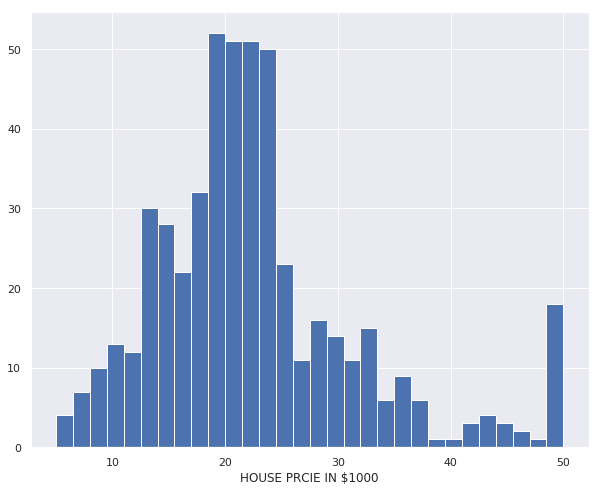
그리고 다음을 입력해준다.
|
1
2
|
correlation_matrix = boston_pd.corr().round(1)
sns.heatmap(data=correlation_matrix, annot=True, cmap='bwr')
|
cs |
pd.corr() 함수가 상당히 중요했던 게, 각 Feature의 상관계수를 뽑아준다. 상관계수가 높을수록 강한 선형성 관계를 갖는다.
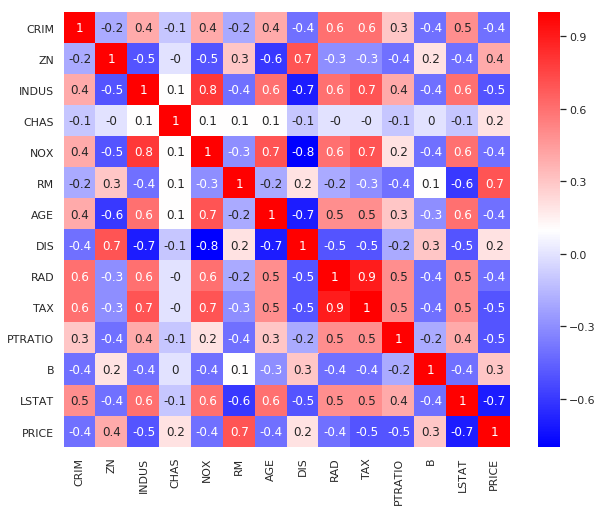
RM과 LSTAT이 가장 큰 값을 갖는 것을 알 수 있다.
RM은 주택 1가구당 평균 방의 갯수이고, LSTAT은 모집단의 하위계층의 비율이 된다.
대충 집의 크기 혹은 평과 하위 계층이라고 생각하면 이해가 되는 것이 우리도 집이 넓을수록 비싸고, 경제적으로 하위 계층 비율이 높을수록 낮은 가격대에 집 가격들이 형성되기 때문이다.
상관계수가 높은 녀석들을 알게 되었으니, 다음과 같이 해주면
|
1
2
3
4
5
6
7
8
9
10
11
12
13
|
plt.figure(figsize=(10,5))
features = ['LSTAT', 'RM']
target = boston_pd['PRICE']
for i, col in enumerate(features):
plt.subplot(1, len(features), i+1)
x=boston_pd[col]
y=target
plt.scatter(x,y,marker='o',s=5)
plt.title("Variation in House prices")
plt.xlabel(col)
plt.ylabel("House prices in $1000")
|
cs |
enumerate()는 인자로 넘어온 목록을 기준으로 인덱스와 원소를 차례대로 접근하게 해주는 반복자(iterator) 객체를 반환해주는 함수이다.

말 그대로 marker o로 점을 찍는 것인데, x를 LSTAT과 RM으로만 받고, y는 target인 집 값으로만 출력했다.
일단 RM을 기준으로 잡고 진행했다. X_room가 RM이 되어 다음과 같이 진행했다.
|
1
2
3
4
5
6
7
8
9
10
11
12
13
14
15
16
17
18
19
20
21
22
23
24
25
26
27
28
29
30
31
32
33
34
35
36
37
38
|
##
import numpy as np
X_rooms = boston_pd.RM
y_price = boston_pd.PRICE
X_rooms = np.array(X_rooms).reshape(-1,1)
y_price = np.array(y_price).reshape(-1,1)
print(X_rooms.shape)
print(y_price.shape)\
"""
(506, 1)
(506, 1)
"""
# 결측치를 확인하고 둘의 차원을 비교한다.
##
from sklearn.model_selection import train_test_split
X_train, X_test, y_train, y_test = train_test_split(X_rooms, y_price, test_size = 0.2, random_state=13)
print(X_train.shape)
print(X_test.shape)
print(y_train.shape)
print(y_test.shape)
"""
(404, 1)
(102, 1)
(404, 1)
(102, 1)
"""
##
from sklearn.linear_model import LinearRegression
reg = LinearRegression()
reg.fit(X_train, y_train)
"""LinearRegression(copy_X=True, fit_intercept=True, n_jobs=None, normalize=False)"""
##
|
cs |
결측치를 확인하고, 잘 나뉘어졌는지를 확인 한다음에, reg로 LinearRegression() 모델을 불러와서 학습시켰다.
대부분의 모델은 fit 메서드를 지원하는데, 해당 메서드는 훈련을 의미하고, predict라는 메서드로 예측을 한다.
model.fit(x_train, y_train) 으로 훈련하고
model.predict(x_train) 으로 확인한다.
|
1
2
3
4
5
6
7
8
9
10
11
12
13
14
15
16
17
18
19
20
|
##
from sklearn.metrics import mean_squared_error
y_train_predict=reg.predict(X_train)
rmse = (np.sqrt(mean_squared_error(y_train, y_train_predict)))
print(rmse)
"""6.558400914980574"""
##
y_test_predict=reg.predict(X_test)
rmse = (np.sqrt(mean_squared_error(y_test, y_test_predict)))
print(rmse)
"""6.7881975443771765"""
##
prediction_space = np.linspace(min(X_rooms),max(X_rooms)).reshape(-1,1)
plt.scatter(X_rooms, y_price) #실제 방과 가격은 점으로
plt.plot(prediction_space, reg.predict(prediction_space), color = 'black', linewidth =3) #방의 개수에 따른 가격은 선으로
plt.ylabel('value of house/1000($)')
plt.xlabel('number of rooms')
plt.show()
##
|
cs |

여기서 rmse는 평균 제곱근 편차(Root Mean Square Deviation; RMSD) 또는 평균 제곱근 오차(Root Mean Square Error, RMSE)는 추정 값 또는 모델이 예측한 값과 실제 환경에서 관찰되는 값의 차이를 다룰 때 흔히 사용하는 측도라고 한다. 그냥 cost function처럼 기억하며, 저 값이 적을수록 좋은 모델이 된다. (Overfitting 주의)
방의 갯수만으로도 나름 선형적인 관계를 확인할 수 있다. 그렇다면 나머지 모두를 고려한 것은 어떻게 될까?
|
1
2
3
4
5
6
7
8
9
10
11
12
13
14
15
16
17
18
19
20
21
22
23
|
##
X= boston_pd.drop('PRICE', axis = 1) #Price를 제외한 나머지 feature가 된다.
y= boston_pd['PRICE']
X_train, X_test, y_train, y_test = train_test_split(X, y, test_size=0.2, random_state=13)
reg_all = LinearRegression()
reg_all.fit(X_train, y_train)
##
y_pred = reg_all.predict(X_test)
rmse = (np.sqrt(mean_squared_error(y_test, y_pred)))
print(rmse)
"""4.9313525841467"""
##
plt.scatter(y_test, y_pred) #test와 predict를 점으로 찍어 비교한다.
plt.xlabel("Actual House Prices ($1000)")
plt.ylabel("Predicted House Prices: ($1000)")
plt.xticks(range(0, int(max(y_test)),2)) #눈금 표시
plt.yticks(range(0, int(max(y_pred)),2))
plt.title("Actual Prices vs Predicted prices")
plt.plot([0,48], [0,48], 'r')
##
|
cs |

선형의 결과를 얻으면서 마무리했다.
'Coding' 카테고리의 다른 글
| house price - 1 - 파악 (0) | 2022.08.14 |
|---|---|
| 과거 정리 - Untitled4.ipynb(타이타닉, 결정나무, pd.cut(), 결측치 처리 등) (0) | 2022.07.03 |
| 과거 정리 - Untitled1.ipynb (Iris, Decision Tree) (0) | 2022.06.27 |
| 과거 정리 - Untitled0.ipynb (import, plt 등) (0) | 2022.06.27 |
| ubuntu 제거 후 grub 커맨드 창 해결 방법 (UEFI) (+CMD 먹통 해결) (0) | 2022.06.25 |


